
In the last few years, a story and book writing app, “Fabula”, has attracted the attention of numerous writers. Suddenly, it again sparks a discussion and their traffic shares countless positive reviews. What made the “Fabula” different from other writing apps?
Are you too interested in knowing about the writing app Fabula?
If yes, this blog is for you. I have reviewed the Fabula writing app and found some very interesting features. It will surely surprise you.
Let’s understand the core first.

Every great story begins with an idea, and transforming that idea into an impactful story requires time, effort, and research. Writers work deeply to develop memorable characters, world, dialogue, scene, pace, and countless story details. As a writer, I can understand the complexity of the process.
It is also a very technical and psychological journey that can’t be managed on separate notebooks, spreadsheets or documents. This is where writers want a perfect writing(screenwriting or novel-writing) tool that manages all their story details in one place, and here “Fabula” comes in.
In this review, I’ll explore everything about the Fabula app. Its features, pricing, user interface, AI capabilities, advantages, limitations, and practical use. This review will surely help you decide whether Fabula deserves a place in your writing workflow.
Let’s dive into it.
What is Fabula?
Fabula is a story and book-writing tool designed to structure story elements before and during the writing process. It is available as an app and is suitable for novelists and screenwriters, too.
Writers can sign up using their email. After signing up, Fabula provides a 10-step guide that explains the structure of the Fabula app for writing a story. Following that guide, the authors can brainstorm ideas, develop detailed character profiles, fictional worlds, chapters, scenes, and a synopsis. They can keep all the story elements with their research in one place.
Fabula offers an easy, simple and structured space. This ease attracts authors to use the platform. Fabula also provides features that help authors brainstorm, refine plots and crush writer’s block.
In recent years, Fabula has gained attention among novelists, new authors and storytellers. Its clean, systematic interface makes it one of the most favourite writing tools recently. It is helpful to manage long-form writing projects with a structure. In fact, some call it the best novel-writing software of today.
How to Get Started with Fabula: A Step-by-Step Guide
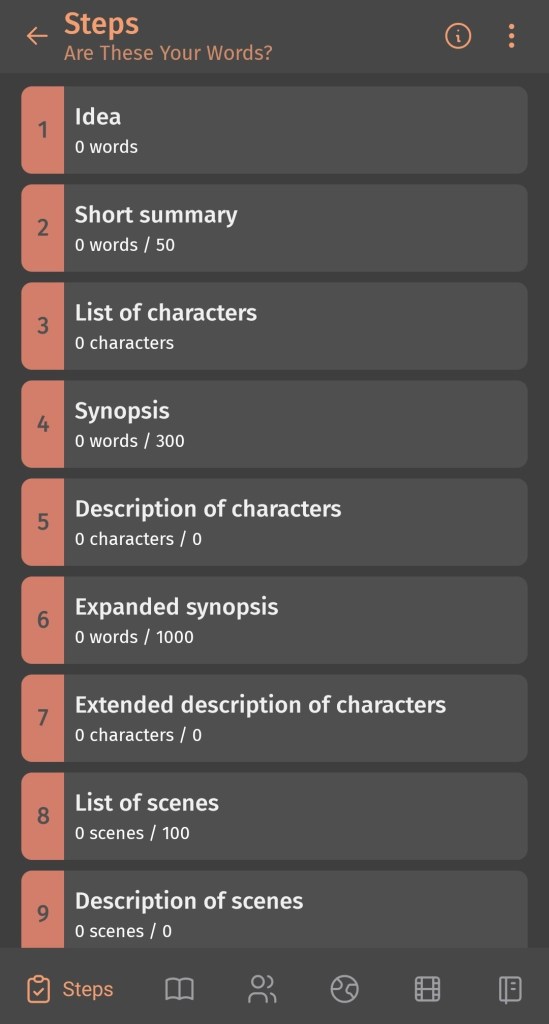
Recently, Fabula has crossed one million installs. I’m also one of those who used this book-writing software. The app follows a simple sign-up and set-up process.
Let’s start with,
1. Dashboard and First-Time Setup
Fabula welcomes authors with a clean dashboard. It provides access to projects, characters, worlds, timelines, and notes. Remember to spend a few minutes exploring the interface before creating your first story.
2. Create an Account
Then the account section comes. Authors can sign up using their email address or preferred authentication method. Once your account is created, Fabula syncs your projects across multiple devices. It allows authors to continue planning their stories wherever they are.
3. Start a New Project
Fabula provides two options: a new book or a new series. Click on your preferred story method and enter your story’s title, genre, and optional description. Here you’ll organise every element of your novel, from idea to worldbuilding details.
4. Add Characters
Fabula’s characters section helps to create detailed character profiles. Authors can add their protagonists, antagonists, and supporting characters to the list. They can save their character’s personalities, relationships, appearances, backstories, and more to maintain their credibility throughout the story.
5. Build Your Story World
Its worldbuilding section provides a space to create kingdoms, historical events, cultures, economies, politics, magic systems, or fictional technologies. Authors can independently build an immersive and believable story universe.
6. Plan Your Story Timeline
The story timeline section helps in arranging events in chronological order. Using Fabula’s timeline feature, authors can map plot, character journeys, and key moments to ensure their progress naturally.
7. Organise Chapters and Scenes
A story is the collection of numerous events, chapters and scenes. Authors can break their novel or story into chapters and scenes within Fabula’s project structure. They can add scene summaries, characters’ points of view, and notes to easily visualise their narrative before writing the first draft.
8. Start Writing and Refine Your Story
Once your planning is complete, begin writing using Fabula’s writing tool. It also provides simultaneous updates to characters, timelines, and scenes as your story evolves.
What Features of Fabula Make it Different from Other Writing Tools
1. Brainstorm Ideas with Writing Assistance
Fabula’s writing assistance is designed to make the writing process easier for authors. It can support the creative process in several ways:
- Guide to develop unique story ideas from a simple prompt or theme.
- Provides suggestions for making credible character sketches.
- Help in experimenting with multiple ideas before selecting the best.
2. Character Builder
The Character builder is another valuable feature of Fabula. It helps writers create real and impactful characters. Writers can store all the information about their characters in one place.
Fabula helps develop:
- Brief character profiles that include names, appearances, backgrounds, behaviour, values, etc.
- Strengths, weaknesses, morals, backstories, fears, and all.
- Web connections between characters, family, friendships, enemies, and alliances. It establishes the emotional reasons behind your characters’ actions.
3. Story Timeline
Fabula’s story timeline feature helps organise events in a perfect order. This feature makes it easy to track the story from beginning to end. Also, it provides a clear visual overview that ultimately helps maintain continuity and structure before drafting. Here,
- Writers can place story events, chapters, and scenes in sequence to keep the plot well organised.
- They can organise main plots and subplots simultaneously.
- Can easily rearrange scenes and events during editing.
4. Worldbuilding

Fabula’s Worldbuilding feature is a space to design an impressive fictional universe. From geography and politics to cultures and magical systems, it helps to create immersive and believable worlds.
Fabula provides world-building areas, such as;
- Countries and cities. Authors can create nations, kingdoms, and cities with detailed descriptions.
- Economy, geography & physical Laws. Can define landscapes, climates, natural resources, trade systems, technologies, and the physical rules that govern the world’s environment.
- Politics. Authors can build governments, ruling families, and legal systems.
- Religion and culture. Work on belief systems, traditions, festivals, languages, social values, and cultural practices.
- History, inhabitants or magic system. Save historical events, legendary figures, races, civilisations, and magic systems with their origins, abilities, and impact.
5. Notes & Research
Fabula’s Notes & Research feature helps writers organise information all in the app. Instead of switching between multiple apps, authors can keep research, ideas, and references all in one place.
Writers can store,
- Articles, historical facts, reference materials, links, and personal research.
- Sudden ideas, dialogue, scenes, concepts, and creative thoughts.
- Character information, plot points, themes, or chapters for quick navigation.
Fabula’s User Interface
1. First Impression

Fabula makes a strong first impression with its clean and writer-focused interface. It focuses on story planning over complex and unnecessary options. It aims to enable authors to quickly access essential writing tools. That’s why Fabula is suitable for both beginners and experienced authors.
2. Language
Currently, Fabula offers its interface only in English. But it is accessible to a broad international audience. Since Fabula is in an evolving phase, maybe additional language support will be introduced in future versions.
3. Mobile Compatibility
Fabula is currently available as a mobile application for iOS and Android. Writers who prefer large screens to work may find the absence of a web application.
Author who are comfortable with mobile-first applications can get the Fabula app directly on their phone here:
- iOS: Download from the App Store.
- Android: Download from the Google Play Store.
4. Loading Speed
Fabula offers a smooth and responsive experience on devices. Its performance may vary depending on device, project size and internet connection, but overall, the app provides fast loading times.
5. Pricing

Fabula follows both a free and a premium model. It allows authors a 5-day free trial to explore the app before upgrading to Fabula Pro. The free version is suitable for testing, while the Pro subscription unlocks advanced planning capabilities.
Recently, it has had two plans:
The most flexible plan, Rs 500/month.
And, a yearly subscription with Rs 4150 costs only Rs 345.83/month.
Advantages of Fabula
Fabula offers several advantages that make it a trustworthy writing tool for authors.
- Fabula keeps every aspect of your story, including characters, scenes, timelines, worldbuilding, and research, within a single project.
- The app features a clean, simple and visually appealing interface.
- It gives space to create reliable and credible character profiles.
- Automatically synchronises projects across supported mobile devices through your account.
- Well-suited for long-term projects, such as novels, fantasy series, etc.
Disadvanatges of Fabula
Having so many advantages, Fabula still has a few disadvantages. Its certain features and restrictions may not suit every writer.
- Fabula supports offline writing for some tasks, but features such as synchronisation and cloud backups require an internet connection.
- The free version offers a good introduction, but many advanced capabilities require a Fabula Pro subscription.
- Fabula focuses primarily on story planning rather than manuscript publishing.
- Its export options are limited compared to dedicated writing software. Authors can transfer their work to another application for final drafting.
- Fabula has no web version available. Writers who prefer desktops or laptops can miss the convenience.
Final Words
If you are searching for a mobile-first story planning tool that combines character management, worldbuilding, timelines, notes, and assistance, Fabula is one of the most promising options available today.
It is a fact that Fabula doesn’t fully replace a full-featured manuscript editor or professional screenwriting software, but it helps writers transform ideas into well-structured stories.
For authors who enjoy planning before drafting, Fabula is a worthy companion that deserves authors’ consideration.
Now, it is your turn, authors!
Have you used Fabula? Which feature is your favourite? Share your thoughts in the comments.
Also, if you found this review helpful, please share it with fellow authors and screenwriters who are searching for the right story-planning tool.
And don’t forget to share your feedback. Your every word matters to us and helps us to grow as a better writing community.
I have also attached the Novel Writing Workbook link. Authors can purchase it to practice novel writing effectively.
Keep reading. Keep learning. Keep writing!
Simran Thakur
Founder & CEO AFAWW
Author| Screenwriter| Audio story scriptwriter| Blogger| Poet
















Leave a comment